
August 10, 2026 | 5 Minute Read
Anyone who operates short-term rentals knows this is not a “set it and forget it” business.
With long-term rentals, tenant communication is usually limited to two things: maintenance requests and late rent payments.
Short-term rentals are completely different. You’re in the hospitality business. You’re essentially operating a small hotel where every guest expects a hotel-quality experience.
Over the past four and a half years, I’ve owned and operated as many as 16 short-term rentals. Today, I have nine. Some properties performed exactly as expected, while others didn’t. We converted a few back to long-term rentals, sold several turnkey to other investors, and sold the remainder to owner-occupants.
After hosting thousands of guests and hundreds of stays, I’ve learned a few lessons about creating a better guest experience. I’ve spent countless hours optimizing my listings, improving guest communication, and identifying problems before they become guest complaints.
No matter how prepared you are, some issues are simply beyond your control. The key is learning from every problem and putting systems in place to keep it from happening again.
It’s also worth mentioning that I don’t operate luxury vacation homes in exotic destinations. My portfolio consists of affordable, necessity-based rentals in Birmingham, Alabama. The challenges are very different.
Here are some of the systems I’ve put in place to minimize guest issues and improve every stay.
1. Perform a Wellness Check Before Every Arrival
This is by far the most important task.
Before every guest checks in, someone walks through the property to verify that housekeeping completed everything correctly. This simple step catches countless issues before a guest ever opens the front door.
I’ve written about my complete wellness checklist here:
“Our Secret to Being Airbnb Super Hosts”
2. Check Every Battery-Powered Device
Nothing creates a bad first impression like a guest who can’t get inside.
Before every arrival, I check:
- Smart lock batteries
- TV remote batteries
- Clock batteries
- Any other battery-powered devices
.
If a smart lock battery dies unexpectedly, guests have to use a lockbox until I can replace the batteries.
3. Provide Plenty of Towels
I plan for at least two towels per guest.
It sounds simple, but I’ve lost count of how many emergency trips I’ve made just to deliver extra towels because housekeeping underestimated what was needed.
4. Keep Backup Blankets in Every Closet
After checkout, blankets are often removed for off-site laundering.
Without backup blankets, housekeeping can’t fully remake the beds before the next guest arrives. During same-day turnovers, this can quickly become a problem.
5. Regularly Restock Kitchenware
Plates, glasses, mugs, and utensils constantly disappear or get broken.
If you don’t routinely check inventory, you’ll eventually receive complaints from guests who don’t have enough dishes for everyone staying in the property.
6. Stock Cleaning Supplies
Guests appreciate having basic supplies available.
I always make sure there are:
- Trash bags
- Dish sponges
- Dishwasher pods
- Flashlights
- Other basic cleaning essentials
.
Small conveniences often make a big difference in guest reviews.
7. Hire Professional Pest Control
I tried handling pest control myself.
Living in the South means dealing with heat, humidity, and insects almost year-round. Eventually I realized professional pest control was worth every penny.
8. Use Flying Insect Traps
Guests frequently leave doors open, allowing flies, mosquitoes, and gnats inside.
I place flying insect traps in kitchens and bathrooms to help eliminate bugs before they become a bigger annoyance.
9. Install Mesh Floor Register Covers
One inexpensive improvement has been installing mesh screens beneath HVAC floor registers.
These help prevent insects from entering the home through the ductwork and have significantly reduced unwanted pests.
10. Replace HVAC Filters Quarterly
Changing HVAC filters every three months improves airflow, helps the system operate efficiently, and reduces unnecessary service calls.
It’s simple preventative maintenance that pays for itself.
11. Trash Container Placement
When I first started hosting, I kept the trash container on the side of the house and relied on guests to roll it to the curb for pickup.
Big mistake.
Most guests simply didn’t do it. That means I have to monitor the camera on the day of trash pick up to see if the trash bin is curbside. If not, I have to make a special trip to “take out the trash.”
Guests are notified in both the check-in instructions, house manual and posted interior notices that the containers must remain curbside. If a guest moves them back to the side of the house and the scheduled pickup is missed, we charge a $35 fee to cover the extra service required.
Since trash is only collected once a week, missing pickup meant someone from my team had to drive to the property, load the overflowing trash, and haul it off for disposal ourselves. It was an unnecessary expense and a constant headache.
Now we leave the trash containers at the curb all the time. There are services who charge monthly about $50 to do this. It’s an unnecessary expense if you simply keep it set expectations with your guests and keep it curbside.
The Biggest Headache: Thermostats
If there’s one thing that consistently causes me stress, it’s heating and air conditioning.
Guests frequently text to say the house is either too hot or too cold.
Surprisingly, only about one out of every ten complaints is actually caused by the HVAC system requiring servicing. The other nine are thermostat-related.
For nearly four years, we used Google Nest thermostats.
They were affordable, easy to install, and allowed me to control temperatures remotely. Before installing them, guests would routinely crank the heat up to 90 degrees in the winter or set the air conditioning to 60 degrees during the summer.
Many guests assume extreme temperature settings will cool or heat a home faster. They don’t.
Those settings only increase utility bills and place unnecessary stress on HVAC equipment.
Installing smart thermostats solved much of that problem—but not all of it.
Why I Moved Away from Google Nest
Google Nest thermostats were inexpensive.
I purchased them for about $130 each, and installation cost another $98, bringing the total to roughly $228 per property.
However, over time I discovered several drawbacks.
Although connected to HVAC power, the thermostats still relied on (2) AAA batteries. Surprisingly, the Nest app doesn’t provide battery-level notifications, so checking and replacing batteries became another recurring maintenance task.
As the years passed, reliability also became an issue.
Several thermostats simply failed without warning. I’d see a thermostat set to 72 degrees but the display was showing 83 degrees.
I’ve replaced at least ten Nest thermostats over the years, and they always seemed to fail on weekends when my HVAC technician wasn’t available.
The other issue, though, was Google’s Eco mode.
When Nest determines a property is vacant, it automatically limits cooling to 76 degrees. When guests return after being away all day, they walk into a warm house—and I receive a text message saying the air conditioning isn’t working. There is simply no way to set it below 76 degrees. And, the only way to get around this is to place a temp hold for the duration of the guest stay. Another manual task I would rather not have to remember.
Why I Switched to Ecobee thermostats
About six months ago, we began replacing the Google Nest thermostats with Ecobee thermostats.
After testing them in four of our largest properties, I was convinced.
Here’s what I like most:
- They’re hardwired to the HVAC system, so there are no batteries to replace.
- Eco mode can be completely disabled.
- I can set minimum and maximum temperature limits. Guests can cool the home only to 68 degrees and heat it only to 76 degrees.
- I can lock advanced settings with an access code so guests can’t accidentally change important system configurations.
- The cost is $139.99 so about the same as Google Nest.
- I have yet to have a malfunction on any of these thermostats.
.
After several months without a single issue, I replaced the remaining Google Nest thermostats.
Honestly, it’s been a huge relief.
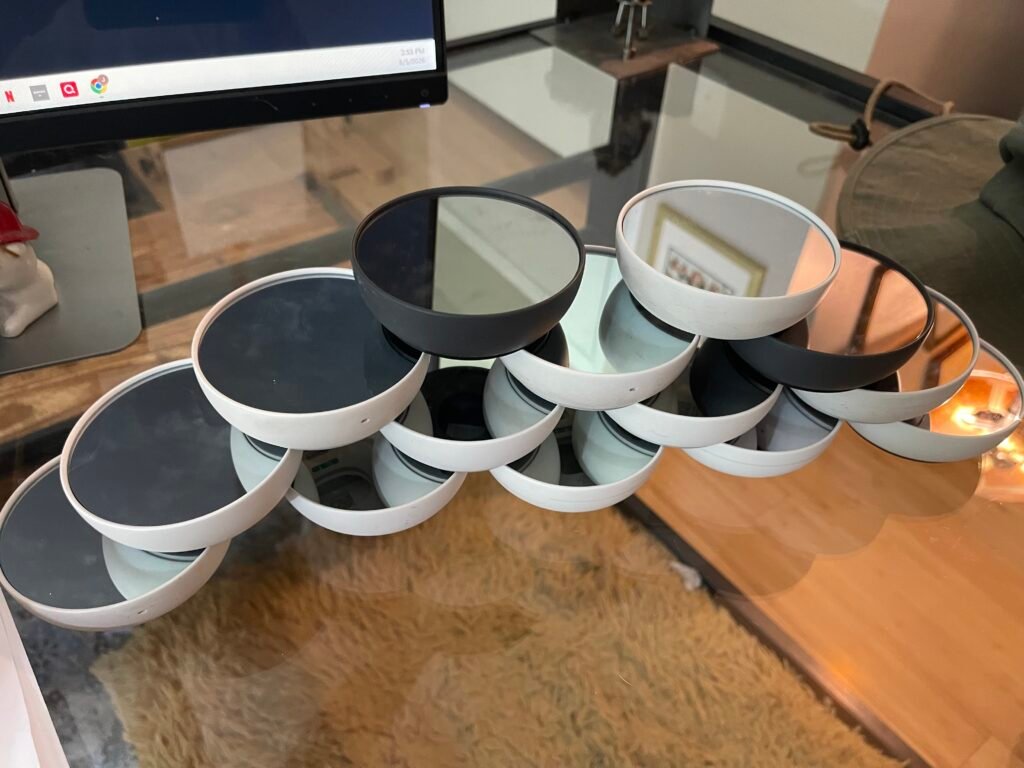
Now I just need to figure out what to do with 14 used Google Nest thermostats sitting on my shelf.
What Would You Add?
Every host operates differently, and every property has its own unique challenges.
This list isn’t exhaustive—it’s simply what has worked well for me after hosting thousands of guests.
I’d love to hear from other hosts.
What causes you the most stress when managing your short-term rentals, and what systems have you put in place to solve it?